PowerShell architecture
This page explains the design of Fluence.Wpf.PowerShell: why the module is shaped the way it is and what that means when you use it. For task instructions, see the walkthroughs.
One module, two library builds
Windows PowerShell 5.1 runs on the .NET Framework; PowerShell 7 runs on modern .NET. This module requires PowerShell 7.4 or later because its Core build targets .NET 8. A WPF assembly compiled for one does not load in the other, so the module ships two builds of the same library, lib/net472 and lib/net8.0-windows10.0.26100.0, and a loader that picks one by $PSEdition at import. The .NET 8 build rolls forward onto the .NET 9 and 10 runtimes that PowerShell 7.5 and 7.6 use, which is why there is no third folder.
The loader loads the chosen folder's sibling assemblies first and then Fluence.Wpf.dll. It deliberately does not hook AppDomain.AssemblyResolve: a PowerShell scriptblock used as a resolve handler can be invoked on a thread with no PowerShell context, and the runtime's attempt to build an error record for it re-enters the resolver and overflows the stack. Eager loading has no such failure mode.
If the process already holds a Fluence.Wpf assembly, the loader reuses it. The CLR will not load a second copy of the same identity into the same context, so the build loaded by the host first remains in use. The module compares versions and warns when that copy is older than the one it ships, because a cmdlet may then reach for a member that does not exist. Type names the library renamed between generations are looked up at call time rather than written as casts, so the same module code runs against both.
Where the UI thread comes from
WPF wants a single-threaded apartment and one Application per process. The module checks the owning dispatcher on each call and chooses an inline STA thread or its own persistent STA runspace.
Inline. The calling thread is STA, which is the default for Windows PowerShell started from a console and for pwsh. The module creates the application on that thread the first time it needs one and shows dialogs there. A modal dialog therefore blocks the script, which is the behaviour a script expects. The progress window is the exception: it is non-modal and shares your thread, so it repaints only when a module cmdlet runs, which is why Update-FluenceProgress also pumps the dispatcher.
Runspace. The calling thread is MTA (pwsh -MTA, some hosting scenarios). WPF cannot run there, so the module opens one STA runspace, imports itself into it and shows every window on that thread. The runspace is published in AppDomain data so a later Import-Module -Force in the same process adopts it rather than starting a second UI thread, which WPF would refuse. Because scriptblocks run over there, the -Initialize, -Content and handler blocks cannot see your functions or variables; the -Data hashtable is the channel across. On unload the module closes its progress window and retains an Application-owning runspace for reuse until the process exits.
For the primary ConsoleHost session, the module registers PowerShell.Exiting to close progress and shut down its owned secondary dispatcher before PowerShell disposes that runspace. Reimporting or removing the module does not end the application. A child runspace, a pushed session, or a custom host does not receive this terminal cleanup hook, because closing one of those sessions need not mean the process is ending. The engine event also does not cover forced process termination or closing the terminal window.
An inline STA dispatcher belongs to the caller's thread. The host remains responsible for ending that dispatcher on its own thread after its final WPF operation. Remove-Module cannot do that safely because the process may import the module again. In a standalone script that owns the WPF application, [System.Windows.Application]::Current.Dispatcher.InvokeShutdown() is terminal cleanup: call it only after the last UI operation, and do not attempt another WPF window in that process. An embedded script must leave this decision to its host.
Existing application. A host application can be reused when the calling PowerShell runspace executes on its dispatcher thread. An application on another foreign thread is rejected with an actionable error. Passing a PowerShell delegate to that dispatcher would not establish a PowerShell execution context, so the module does not attempt it.
Closures on a separate UI runspace and pumping on the inline thread follow different rules; the how-to guides call those out.
Theme seeding and the three slots
The ControlsTour window is a visual example of the module-hosted Fluence window in light and dark themes.
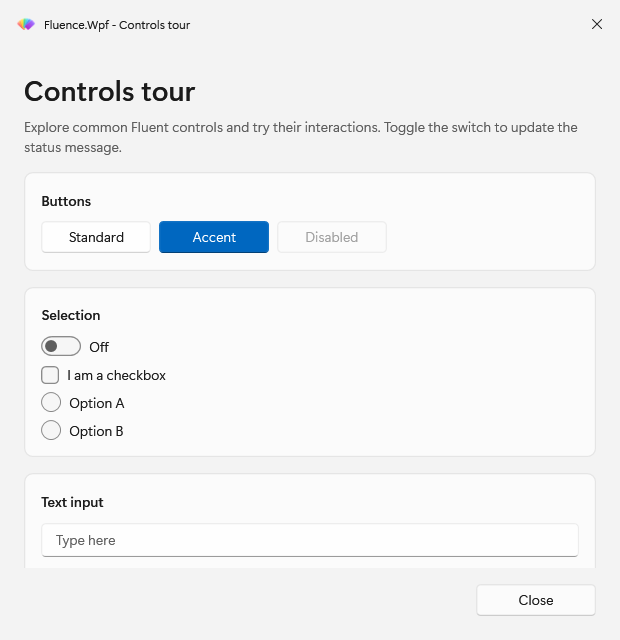
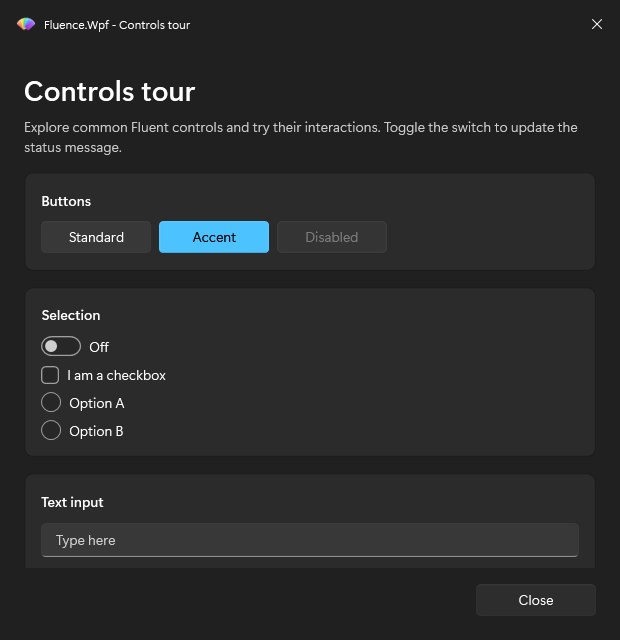
The library's theme engine publishes computed colours and brushes into Application.Current.Resources.MergedDictionaries as three dictionaries: the computed colours and brushes in slot 0, the typography in slot 1 and the control templates in slot 2. Slots 1 and 2 load once. Slot 0 is replaced when a resolved theme, accent, or another input to the computed resources changes. A backdrop request can change without replacing slot 0. Duplicate applies that produce the same resources do not republish them.
This is why the module creates the application before it applies a theme, applies a theme before it shows anything, and never merges a dictionary itself. -Theme, -Backdrop, and -Accent on one dialog set process state that later dialogs inherit. Set-FluenceTheme can change windows that are already open through dynamic resources. A dialog applies an appearance option only when you pass it, so it does not undo an earlier Set-FluenceTheme or Set-FluenceAccent. The first Fluence call seeds Auto, Mica, and the system accent; the flag recording that lives in an AppDomain data slot shared with the UI runspace on an MTA host.
Why specifications are plain objects
New-FluencePrompt and New-FluenceButton return PSCustomObjects tagged with a PSTypeName, not instances of .NET classes, and the dialog result is another PSCustomObject whose properties are named after your prompts and buttons. The reasons are practical. A spec built in your runspace has to cross to the UI runspace on an MTA host, and plain objects can be passed by reference to the local UI runspace without defining and loading a custom type in both. A result with one property per prompt name is natural to read ($result.Server, $result.Install) and cannot be modelled as a fixed class. And a script can build a spec from a hashtable or JSON without calling the constructor cmdlets at all, as long as the shape matches the one in the reference.
Why the module runs in-process
The module could have started a separate process for the UI and talked to it over a pipe. It runs the dialogs in the calling process instead, for three reasons. A host calling from its WPF dispatcher can share its application and theme with the module; a second process could not share them. The dialog result has to carry live values, including -ValidateScript scriptblocks that run against them, which a process boundary would complicate. And the failure mode of an in-process dialog is an exception the script can catch, rather than an orphaned window.
The cost is the threading model above and the single-assembly rule: the process decides which library is loaded, not the module.
Why the module is not in the solution
Fluence.Wpf.PowerShell is a script module with no compiled code of its own. It lives at the repository root, next to the C# projects, but is not a project in Fluence.Wpf.sln. Its gate is PSScriptAnalyzer plus Pester, run by build/Test-Module.ps1, and its dependency on the library is a staging step (build/Build-Module.ps1) that copies the library's Release output into lib/. Keeping it out of the solution keeps dotnet build and dotnet test unchanged for library work and lets the module follow PowerShell conventions (one function per file, comment-based help, Allman braces, 5.1-compatible syntax) that would fight the C# analyzers if the two were one build.
Related
- Basic Usage to try the module
- Walkthroughs for tasks
- Reference for facts
- theming.md for the library's theme engine in depth